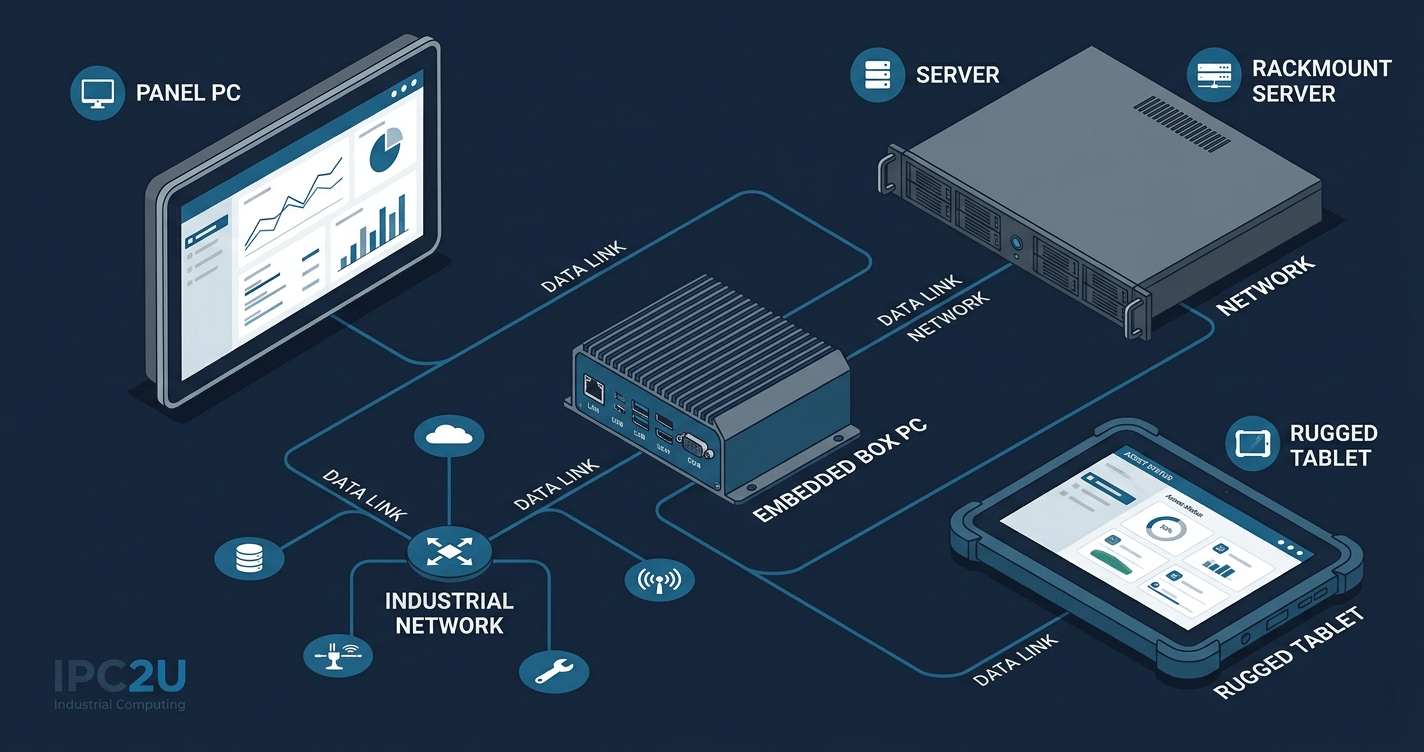
Industrial PCs power factory automation, machine vision, transportation systems, energy infrastructure and medical devices — any application where reliability, longevity and serviceability matter more than graphics performance or cost. The term "industrial PC" broadly covers a family of form factors: panel PCs with integrated touchscreen displays, fanless embedded box computers, rackmount servers, DIN rail computers and rugged mobile tablets.
How Is an Industrial PC Different from a Commercial Computer?
These differences translate directly into total cost of ownership. A commercial computer at one-fifth the purchase price of an industrial unit will typically fail or require servicing within 12–24 months in an industrial environment, versus 7–10 years for a purpose-built IPC.
| Characteristic | Commercial PC | Industrial PC |
|---|---|---|
| Operating temperature | 0 °C to +40 °C (typical) | −20 °C to +60 °C (standard) or −40 °C to +85 °C (extended) |
| Thermal design | Active cooling (fan) | Fanless conduction cooling (common) or variable-speed fan |
| Shock resistance | 5–10 G (brief) | 50–100 G, 11 ms (IEC 60068-2-27 / MIL-STD-810) |
| Vibration resistance | 0.5 G | 3–5 G RMS (IEC 60068-2-64) |
| Ingress protection | None | IP40 (sealed enclosure) to IP67 (water immersion) |
| Humidity | 10–80% non-condensing | 5–95% condensing (with conformal coating) |
| Product lifecycle | 12–18 months | 5–7 years minimum; 10+ years for COTS platforms |
| MTBF | Not rated | 50,000–150,000 hours (certified) |
| EMC/EMI protection | Basic CE/FCC | Full CE/FCC industrial + IEC 61000 series |
Industrial PC Form Factors
What all industrial PC form factors share is adherence to industrial-grade specifications that consumer and commercial products do not meet. The right form factor depends on the installation environment, dimensional constraints and required I/O.
Embedded Box PC
Sealed or semi-sealed rectangular chassis without an integrated display. Fanless models use aluminium extrusion heatsink designs to conduct CPU heat to the chassis. Typical I/O includes multiple serial ports (RS-232/422/485), GigE LAN, USB, isolated DI/DO for PLC integration, and PCIe expansion.
Applications: machine control, data acquisition, edge computing, protocol conversion.Industrial Panel PC
An integrated display and computer in a single sealed unit. Screens range from 7 inches (HMI terminals) to 24 inches (operator consoles). IP65 or IP66 front-panel sealing allows direct hosing down. Resistive or PCAP touchscreens operate with gloves.
Applications: HMI, SCADA operator stations, production line supervisory displays.19" Rackmount Computer (1U–4U)
Designed for installation in standard 19-inch server racks within control cabinets. Combines industrial-grade components with rack-mount chassis. Fanless 1U and fan-cooled 2U/4U systems are both available.
Applications: control room servers, data historians, vision inspection servers, edge data centres in harsh locations.DIN Rail Computer
Ultra-compact embedded computers designed to mount on standard 35 mm DIN rails inside electrical panels alongside PLCs and I/O modules. Typically fanless, drawing under 10 W, and operating from wide-voltage DC power (9–36 V).
Applications: industrial IoT gateway, protocol converter, remote monitoring node.Rugged Industrial Tablet PC
Battery-powered, IP65 or MIL-STD-810-certified mobile computers for fieldwork, warehouse operations and maintenance technicians. Sunlight-readable displays (800+ nits), hot-swap battery, barcode scanner and RFID options.
Applications: field service, warehouse management, asset inspection.COM Express / PICMG Boards
Processor and I/O boards following open computer-on-module or backplane standards (COM Express Type 6/7, PICMG 1.3). Allow system integrators to build custom OEM industrial computers by pairing processor modules with carrier boards.
Applications: custom OEM industrial controllers, specialised test equipment.Key Industrial PC Specifications Explained
| Specification | What it means | Typical industrial value |
|---|---|---|
| Operating temperature | Certified ambient range without performance degradation. Extended models use industrial-grade DRAM, SSD and capacitors rated beyond the commercial range. | −40 °C to +85 °C (extended) |
| IP rating (IEC 60529) | First digit = solid particle protection (0–6). Second digit = liquid protection (0–9K). IP65 = dust-tight + water jets. IP67 = dust-tight + 1 m immersion. | IP65 to IP67 |
| Shock (IEC 60068-2-27) | G-force over millisecond duration. Solid-state storage (CFast, M.2 NVMe) is essential — rotating HDDs fail under shock. | 50 G, 11 ms, half-sine |
| Vibration (IEC 60068-2-64) | G-RMS over frequency sweep. Fanless construction required for high-vibration installations. | 3 G RMS, 5–500 Hz |
| MTBF | Calculated per MIL-HDBK-217 or Telcordia SR-332. 100,000 hours ≈ 11.4 years of continuous operation. | 50,000–150,000 hours |
| Wide-voltage DC input | Protects against voltage spikes and brownouts common in factory, vehicle and field installations. Often includes reverse-polarity and over-voltage protection. | 9–36 V or 18–75 V |
Selecting the Right Industrial PC — A Checklist
Before specifying an industrial PC for a new application, confirm the following eight points to avoid costly misspecification:
- Environmental rating: What is the maximum and minimum ambient temperature? Is dust, moisture, water jets or immersion possible? What shock and vibration levels will the enclosure experience?
- Processing requirements: What OS will you run? Does the application require real-time performance (EtherCAT, PROFINET)? Does it require AI inference (GPU or NPU)?
- I/O requirements: Count the serial ports (RS-232/422/485), GigE ports, USB ports, isolated DI/DO lines and any specialised interfaces (CAN bus, PCIe expansion) needed.
- Storage: SSD (M.2 NVMe or SATA) for OS and application. CFast or SD card for logging where shock resistance is paramount. Avoid HDDs in high-vibration installations.
- Power: Will you supply 24 V DC (common in industrial panels), wide-range DC (9–36 V for vehicle or field), or AC mains? Confirm power consumption vs. available supply capacity.
- Form factor and mounting: DIN rail, panel cutout, rackmount, desktop or vehicle mount? What are the dimensional constraints?
- Certifications required: CE and FCC (standard). E-Mark for road vehicles. IEC 60601-1 for medical. ATEX/IECEx for hazardous areas. MIL-STD-810 for defence/harsh field use.
- Lifecycle: How many years must spare parts be available? Minimum 5 years recommended for new deployments; specify the manufacturer's EOL policy in the procurement contract.
Industrial PC Standards and Certifications Reference
| Standard | Scope |
|---|---|
| IEC 60068-2-1/2 | Cold and heat test |
| IEC 60068-2-27 | Shock test |
| IEC 60068-2-64 | Random vibration test |
| IEC 60529 | Ingress protection (IP) rating |
| MIL-STD-810H | US military environmental engineering |
| IEC 61000-4 series | Electromagnetic compatibility (EMC) |
| IEC 60601-1 | Medical electrical equipment safety |
| E-Mark (ECE R10) | Vehicle electrical/electronic components |
| ATEX Directive / IECEx | Explosive atmospheres |
| UL 508A | Industrial control panels (North America) |
Industrial PC Products at IPC2U
- Industrial Box PCs — Fanless Embedded Computers for Automation
Wide selection of fanless industrial box PCs with Intel Core/Atom processors, RS-232/422/485, isolated DI/DO, wide-voltage DC input, and operating temperature down to −40 °C. DIN rail, panel, and wall-mount options available.
- Industrial Panel PCs — Integrated Touchscreen HMI Systems
Panel PCs with IP65/IP66 front-panel sealing, 7" to 24" PCAP or resistive touchscreens, glove-operable, stainless steel or aluminium bezel options. Suitable for food processing, pharmaceutical and outdoor installations.
- 19" Rackmount Industrial Computers — 1U to 4U Rack Solutions
1U fanless and 2U/4U fan-cooled rack-mount industrial computers for control room servers, data historians and vision inspection servers. Standard 19-inch EIA form factor, industrial-grade components.
- DIN Rail Embedded PCs — Ultra-Compact Controllers for Electrical Panels
Fanless DIN rail computers mounting directly on 35 mm rails alongside PLCs and I/O modules. Wide-voltage DC input (9–36 V), RS-232/422/485, GigE LAN, under 10 W power draw. For industrial IoT gateways, protocol converters and remote monitoring nodes.
- Rugged Tablet PCs — MIL-STD-810 Mobile Industrial Computers
IP65-rated and MIL-STD-810-certified rugged tablets with sunlight-readable 800+ nit displays, hot-swap batteries, barcode scanners and optional RFID. For field service, warehouse management and asset inspection.
- Edge AI Computing Platforms — Industrial PCs with AI Inference Hardware
Industrial-grade edge AI systems integrating NVIDIA Jetson, Intel Core with NPU, and GPU-accelerated platforms for machine vision, defect inspection, and real-time AI inference at the factory edge.
- COM Express Processor Modules — OEM Embedded Computing Boards
COM Express Type 6/7/10 processor modules for custom OEM industrial controllers and specialised test equipment. Integrates CPU, memory and core I/O onto a standard module plugged into application-specific carrier boards.
Frequently Asked Questions
What does IPC stand for?
IPC stands for Industrial Personal Computer. The abbreviation is widely used by hardware manufacturers, system integrators and automation engineers to distinguish industrial-grade computing hardware from commercial office and consumer equipment.
Can I use a regular PC instead of an industrial PC?
For office or laboratory environments, commercial PCs are adequate. In factory floors, outdoor installations, vehicles or medical equipment — where temperature, vibration, dust, moisture or continuous 24/7 operation are factors — commercial PCs will fail prematurely, causing unplanned downtime. The total cost of repeated commercial PC replacements typically exceeds the initial investment in a purpose-built industrial PC within 2–3 years.
What processor do industrial PCs use?
Most industrial PCs use Intel Core (i3/i5/i7/i9), Intel Atom/Celeron/Pentium, or AMD Ryzen Embedded/EPYC processors. For AI workloads, NVIDIA Jetson ARM-based platforms are also common. All processors used in industrial designs are sourced from industrial-grade product lines with extended temperature and lifecycle guarantees.
Is fanless design better for industrial PCs?
Fanless design is preferred wherever dust, liquids or vibration are present, because fans are a common failure point. Fanless computers use conduction cooling — heat is conducted from the CPU through the chassis to be dissipated by the outer surface. The trade-off is slightly higher chassis temperature and lower maximum processor TDP versus actively cooled systems.
What certifications should an industrial PC have?
Minimum: CE and FCC for EMC compliance. Additionally: IEC 60068-2-27/64 for shock and vibration, IEC 60529 (IP rating) for ingress protection, and MIL-STD-810H for harsh military/field use. Medical applications require IEC 60601-1; vehicle installations require E-Mark (ECE R10); hazardous areas require ATEX or IECEx.